Drone Operations Checklist: Six Phases for FAA Compliant Pilots
Drone Operations Checklist: Six Phases for FAA Compliant Pilots
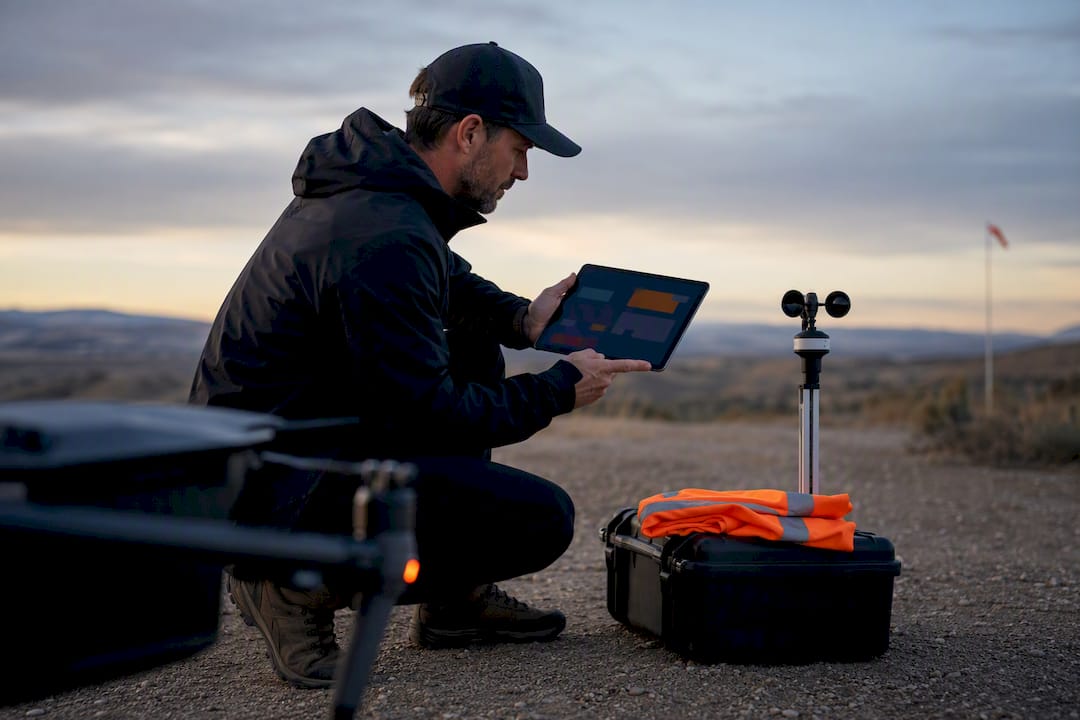
A compliant drone operations checklist runs through six phases: desktop planning, on-site airframe inspection, systems verification, a go/no-go run-up, a crew brief, and an emergency protocol. Under 14 CFR § 107.49, the remote pilot in command must verify airworthiness before every flight, not just the risky ones. A copy-ready version of this checklist follows below.
- Pre-flight desktop planning must include terrain data import, mission simulation, sensor parameter setting, and site access permissions to avoid costly troubleshooting on-site.
- On-site drone inspection requires a systematic walk-around focusing on the frame, fasteners, propellers, payload security, maintenance logs, and proper sign-off to ensure airworthiness.
- Confirm airspace class, LAANC or ATC authorization, and weather conditions including visibility, wind, and NOTAMs immediately before flight to prevent airspace violations or safety risks.
- Firmware, telemetry, and logging checks are essential to verify system stability, GPS lock, and data integrity, reducing in-flight failures caused by software or communication issues.
- Maintaining a comprehensive, easily accessible documentation trail—including pilot credentials, authorizations, insurance, and battery health—is critical for compliance and post-flight audits.
Flydronable
Simplify Your Drone Operations
Dronable brings airspace safety, flight logs, credentials, and client tools together for more organised aerial operations.
Table of Contents
- What Belongs on a Pre-Flight Drone Checklist Before You Leave the Office?
- How Do You Inspect a Drone Before Flight on Site?
- How Do You Verify Airspace and Weather Before a Drone Flight?
- What Software and Connectivity Checks Come Before Launch?
- What Is the Final Go/No-Go Check Before Takeoff?
- What Documents Must a Drone Pilot Carry for Compliance?
- How Should You Inspect Drone Batteries Before Flight?
- What Payload and Camera Checks Matter Before Flight?
- How Do You Brief a Drone Crew Before a Mission?
- What Should You Do If a Drone Loses Signal or Must Abort?
- Why Checklist Discipline Separates Professional Operators From Everyone Else
- Where Dronable Fits Into Your Drone Operations Checklist
- Sources
- FAQ
What Belongs on a Pre-Flight Drone Checklist Before You Leave the Office?
Desktop work determines whether the field portion of your mission runs in twenty minutes or two hours. Pilots who show up unprepared end up troubleshooting terrain surprises, battery math, and paperwork gaps on-site, which is the most expensive place to solve them.
Start by importing terrain and obstacle data for the site. Digital elevation models and obstruction layers reveal towers, tree canopy, and elevation changes that a satellite thumbnail hides. Run a mission simulation next. Most flight-planning software will estimate battery draw against your planned flight path, sensor payload, and wind assumptions, giving you a real number instead of a guess.

Set your sensor parameters before you drive anywhere. Ground sample distance (GSD), image overlap percentage, and exposure settings depend on the deliverable, whether that’s a mapping product, a thermal survey, or a cinematic package for a client. Getting these wrong means a second trip.
Desktop planning should also nail down:
- Takeoff and landing zones, plus at least one emergency landing zone along the flight path
- Site access permissions and any landowner contact information you’ll need on arrival
- Required documents: waivers, LAANC authorization printouts, insurance certificates
- Written assumptions and contingencies, so the plan holds up if a reviewer asks why you made a call
Field connectivity is often unreliable in rural or industrial sites, which is why downloading airspace data and maps before you leave matters more than it sounds like it should. A practical field-data guide makes the same point about preparing your data pipeline before you’re standing in a field with no signal.
Pro Tip: Save your mission simulation output and desktop assumptions as a PDF attached to the job file. If a client or insurer ever asks why you chose a flight path, you’ll have the answer in writing instead of relying on memory.
How Do You Inspect a Drone Before Flight on Site?
The walk-around is where mechanical failures get caught before they become airborne failures. Work it in a fixed order every time, not a random glance at whatever catches your eye first.
- Frame and arms. Check for hairline cracks, warping, or stress marks around the arm mounts, especially after a hard landing on a previous job.
- Fasteners. Confirm every screw, especially on arm mounts and landing gear, is torqued and none are missing. Vibration loosens fasteners over repeated flights.
- Propellers and motors. Spin each motor by hand to feel for grinding or resistance, and inspect props for chips, delamination, or stress whitening near the hub. Replace any propeller showing a crack, even a small one; props are cheap, and a failed one mid-flight is not.
- Payload and mount security. Verify gimbal screws, harness straps, and payload connectors are seated and locked, particularly if you swapped sensors since the last flight.
- Maintenance log cross-check. Pull the aircraft’s maintenance record and confirm no deferred item, like a suspect ESC or a battery flagged for retirement, is still outstanding.
- Sign-off. Whoever performs the inspection initials and timestamps it in the flight log. On a crew, this should never be the same person who skips it because “someone probably already checked.”
This walk-around satisfies more than good habit. AC 107-2A frames preflight inspection and safety risk assessment as a documented expectation, not an optional courtesy.
How Do You Verify Airspace and Weather Before a Drone Flight?
Confirm airspace class and any LAANC or ATC authorization before you leave your desk, then re-check it on-site. Authorizations can be pending, expired, or superseded by a new NOTAM you didn’t see that morning. The FAA’s UAS resource hub links directly to B4UFLY, LAANC, and Remote ID guidance, and it’s worth bookmarking rather than relying on a third-party app alone.
Check NOTAMs and TFRs immediately before flight, not the night before. A temporary flight restriction for a VIP movement, wildfire suppression, or a stadium event can appear with almost no warning. Any NOTAM restricting the airspace class or altitude your mission needs is a blocking NOTAM, full stop.
Weather minima deserve the same discipline:
- Visibility of at least 3 statute miles from the control station
- Wind speeds within your airframe’s rated tolerance, not just what feels flyable
- No precipitation or icing conditions affecting the airframe or sensor
- A current check of Aviationweather for METARs, TAFs, and graphical briefings, rather than a generic weather app
Statistic Callout: Night operations under Part 107 require anti-collision lighting visible for at least 3 statute miles, plus specific pilot training, per 14 CFR § 107.49. That single requirement changes your entire preflight sequence, not just your equipment list.
Save a screenshot of your weather briefing and LAANC receipt with the flight log. It becomes the audit trail if anyone questions the flight later.
What Software and Connectivity Checks Come Before Launch?
Firmware and telemetry checks catch the failures that don’t show up on a visual inspection. This is also where sloppy habits, like always installing the newest firmware release, create risk on jobs where reliability outweighs new features.
- Firmware policy: run a tested, stable build the team already knows, rather than the newest release, on any commercial or critical mission. AC 107-2A’s operational framework supports this conservative approach for preflight risk management.
- Telemetry and link health: verify RC signal strength (RSSI), confirm GPS or RTK lock meets your accuracy requirement, and check redundant links if your operation requires them.
- Remote ID and logging: confirm Remote ID broadcast is active where required, and that flight logging is running before takeoff, not started retroactively.
- Mission upload integrity: check waypoints loaded correctly and return-to-home altitude and behavior are set for the site’s obstacles.
- Storage media validation: format SD cards fresh and shoot a sample capture to confirm the payload data pipeline works before committing to the full mission.
Skipping that last step is a common, avoidable mistake. Formatting cards and running a sample shot prevents mid-mission data failures that otherwise surface only after you’ve already flown the job.
What Is the Final Go/No-Go Check Before Takeoff?
The run-up sequence is your last gate. It’s short by design, because a pilot buried in a fifty-item list at the launch pad starts skipping steps.
- Power up in order and confirm telemetry values look sane: battery voltage, GPS satellite count, compass calibration status.
- Props off, controls live. Verify stick inputs move the correct control surfaces or motors respond correctly in the app, with no propellers attached.
- Props on, motors live. Spin up briefly and listen for unusual noise or vibration.
- Hover test. Lift to 5 to 10 feet, confirm position hold, heading accuracy, and that vibration or noise is within normal range.
- Abort criteria, stated out loud. If position hold drifts, GPS lock drops, or vibration feels wrong, land now. Don’t troubleshoot in the air.
The PIC states a clear verbal sign-off, something as simple as “clear to proceed,” before committing to the mission. If the hover test raises any doubt, the answer is land, not “let’s see what happens at altitude.”
Pro Tip: Assign one specific fallback action to each abort trigger in advance, land now, return-to-home, or return-to-safe-zone, so nobody has to decide under pressure which option applies.
What Documents Must a Drone Pilot Carry for Compliance?
Every commercial flight needs an audit trail that holds up months later, not just a mental note that “everything looked fine.”
- Remote Pilot Certificate, government-issued photo ID, and aircraft registration, ready to present to law enforcement or FAA personnel on request
- LAANC or ATC authorization receipts, any waiver documentation, and proof of insurance
- Signed landowner or site-access permissions, especially for private property
- A checklist sign-off attached to the flight log, ideally through an operations manual structure rather than a loose paper form
An operations manual gives this structure a backbone. Sample OM frameworks used for advanced permissions include site safety assessment, preflight checks, and records retention expectations that regulators recognize. Part 107.49 puts the legal weight behind this: the remote PIC is responsible for verifying airworthiness before flight, and documentation is how you prove you did it. Confirm your insurance coverage matches your operation type; drone insurance requirements and costs vary by jurisdiction and by whether you’re flying commercial or hobbyist missions.
How Should You Inspect Drone Batteries Before Flight?
Battery failures are among the most preventable causes of a lost aircraft, and most of them show a warning sign beforehand.
- Visually inspect every pack for swelling, punctures, or connector corrosion before it goes anywhere near the aircraft.
- In cold conditions, pre-warm batteries per the manufacturer’s guidance; cold cells deliver less usable capacity and can trigger false low-voltage warnings mid-flight.
- Calculate reserve conservatively: estimate mission consumption, then add a 30% reserve as a baseline policy, or follow your manufacturer’s published reserve table if it’s more conservative.
- Label packs and track cycle counts across your fleet, so no one flies a battery nearing end of life without knowing it.
Statistic Callout: A battery showing any swelling or physical deformation should be quarantined immediately and logged, not “flown one more time to see.” Retirement criteria belong in your maintenance log alongside the cycle count that triggered it.
What Payload and Camera Checks Matter Before Flight?
A perfect flight with unusable data is still a failed mission. Payload checks confirm the aircraft will bring back something worth processing.
- Verify camera settings against the mission’s deliverable, matching GSD and shutter speed to your sensor and altitude plan.
- Remove gimbal locks, clean the lens, and confirm the sensor is reporting correctly in the app before takeoff.
- Format SD cards, confirm available storage, and shoot a sample capture to validate the full data pipeline works end to end.
- Check payload cabling and power draw, and watch for electromagnetic interference risk near high-power equipment or antennas on-site.
- Confirm your file naming and ingestion workflow before the flight, so post-flight QA doesn’t start with a folder of unlabeled images.
How Do You Brief a Drone Crew Before a Mission?
A short verbal brief keeps everyone aligned on objective, hazards, roles, radio frequencies, and abort criteria before the aircraft ever leaves the ground. Skipping it because “everyone already knows the plan” is how coordination failures happen mid-mission.
- State the mission objective, known hazards, and each team member’s role out loud
- Assign observers or spotters and confirm exactly what they’re watching for
- Establish comms channels and an escalation path if something goes wrong
- Document the brief and any deviations from the standard plan in the flight log
Pilot fitness deserves the same attention as the aircraft. The I’M SAFE check, Illness, Medication, Stress, Alcohol, Fatigue, Emotion, is a quick personal self-assessment worth running before every mission, and worth documenting when the answer isn’t a clean “fit to fly.” Crews that formalize this in training tend to catch problems earlier; the Academy training resources cover this alongside certification prep.
Pro Tip: Keep the brief under three minutes for routine jobs. If it’s taking longer, the mission is probably complex enough to need a written plan, not just a verbal one.
What Should You Do If a Drone Loses Signal or Must Abort?
Clear abort triggers, decided in advance, turn a crisis into a procedure.
- Define abort triggers explicitly: GPS loss, erratic control response, battery below reserve threshold, sudden weather change, or airspace conflict.
- Follow the lost-link decision tree: hover and wait briefly for reconnection, then return-to-home, then land immediately if RTH altitude clears no obstacles.
- Notify immediately after any incident: insurer, client, and, where required, the FAA or local authorities.
- Preserve evidence: save flight logs, telemetry data, and any witness statements before memory fades or files get overwritten.
- Run rehearsal drills periodically and log the outcomes, so the decision tree is muscle memory rather than something read for the first time during an actual emergency.
Why Checklist Discipline Separates Professional Operators From Everyone Else
Most preflight failures aren’t equipment failures. They’re skipped steps, the SD card that wasn’t formatted, the NOTAM checked the night before instead of on-site, the battery cycle count nobody tracked. Desktop preparation is what buys back field time; every terrain layer imported and document gathered ahead of arrival is a problem you solved before it cost you daylight.
Automation helps here more than most pilots expect. A checklist template that lives in the same place as your flight logs, rather than a printed sheet that gets lost in a truck cab, closes the gap between “we have a procedure” and “we actually followed it every time.” Some tools reduce the airspace-verification step from a multi-tab research project to a single check, which matters most on the days you’re rushing.
Where Dronable Fits Into Your Drone Operations Checklist
Every phase covered above maps to a specific gap that scattered tools leave open. An integrated airspace verification and authorization tool handles those steps directly, so you’re not toggling between multiple apps to confirm LAANC status and NOTAMs. A digital credential management system keeps your certifications in one place, ready to present without digging through folders. Automated flight logs capture the sign-offs, weather snapshots, and battery data this checklist calls for, building the audit trail regulators and insurers expect without extra paperwork after the flight.

A centralized operations manual turns this entire checklist into an exportable, sign-off-ready document instead of a loose PDF you hope you can find later. If you’re tired of managing separate spreadsheets, weather bookmarks, and paper sign-off sheets for every mission. Start by exploring Dronable’s operations tools and see which checklist phase it saves you the most time on first.
Sources
- 14 CFR § 107.49 - Preflight familiarization, inspection, and actions for aircraft operation
- AC 107-2A — Small Unmanned Aircraft Systems (sUAS) advisory circular
- Aviationweather
FAQ
What Does a Drone Preflight Checklist Include?
A complete drone preflight checklist covers six blocks: desktop mission planning, airframe and propulsion inspection, battery and power checks, payload and sensor verification, airspace and weather confirmation, and a final go/no-go run-up before launch.
What Is the 1:1 Rule for Drones?
The 1:1 rule refers to obstacle avoidance planning, maintaining at least one foot of horizontal distance for every one foot of altitude near obstacles, though pilots should always favor larger buffers over the strict minimum when site conditions allow.
Is It Illegal for My Neighbor to Fly a Drone Over My Property?
Airspace above private property generally falls under federal jurisdiction rather than the property owner’s control, though state trespass, privacy, and nuisance laws can still apply depending on altitude and intent; specific outcomes vary by state and should be confirmed with local authorities.
Can the FAA Know You Flew a DJI Drone?
Yes, in many cases. Remote ID broadcasts identifying and location information during flight, and the FAA can access flight data through Remote ID compliance checks or, in an investigation, through manufacturer records and flight logs tied to a registered aircraft.
How Often Should I Review My Drone Operations Checklist?
Review and update your checklist whenever firmware changes, equipment is added to the fleet, or a regulatory update, like a new Remote ID requirement, takes effect, and audit the full document at least annually against AC 107-2A guidance.
Recommended
Explore Dronable Tools
Deepen Your Knowledge
Get step-by-step video courses in the Dronable Academy — FAA Part 107, EASA, real estate drone photography, and more.
Browse CoursesFree: How to Start a Drone Business
The complete step-by-step guide to turning your passion for flying into a profitable drone business — completely free.
- 10 steps to launching your drone business
- 51 proven drone business ideas
- How to get FAA certified (Part 107)
- Pricing, clients & recurring income
Join the Dronable Newsletter
Get drone tips, new articles, and exclusive deals straight to your inbox. No spam, unsubscribe anytime.


