Avoid FAA 24 Month Lapse: Training Record Management for Drone Pilots

Avoid FAA 24 Month Lapse: Training Record Management for Drone Pilots
Training record management for drone pilots means keeping verified, time-stamped proof of certificates, recurrent training, and flight history, each one linked to the pilot and aircraft that flew. The minimum acceptable setup is digital, exportable, and ready to hand over on request. Paper folders and scattered PDFs do not meet that bar. Audits and client contracts move fast, and your records need to move just as fast.
- Maintaining digital, exportable records linked to pilot, aircraft, and project details ensures quick retrieval during inspections or client requests.
- Flight logs, maintenance records, and training certificates require retention periods of 12–24 months, or lifespan of the aircraft, with active oversight.
- Automated workflows for training reminders, certificate dashboards, and flight log capture reduce compliance risks and eliminate manual errors.
- Summarized export packages should include exam IDs, serial numbers, timestamps, and a clear change history for audit readiness.
- Using integrated systems like Dronable consolidates credential, flight, and safety data, enabling faster audits and more efficient client onboarding.
Table of Contents
- What Training and Credential Records Do You Need to Keep?
- How to Organize Records So They’re Retrievable and Auditable
- Retention Schedules: FAA, EASA, and Sensible Windows for Operations
- Workflows and Automation That Reduce Risk
- Presenting Records to Inspectors and Clients
- Why Audit-Ready Record Workflows Actually Matter
- How Dronable Supports Training Record Management
- Sources
What Training and Credential Records Do You Need to Keep?
Inspectors and clients both want the same thing: proof you were legally authorized to fly, on that date, with that aircraft. The list is shorter than most pilots think, but every item has to be retrievable in seconds, not dug out of email attachments.
Here’s what belongs in a complete pilot file:
- Remote Pilot Certificate (Part 107) or, for non U.S. operators, the equivalent national credential issued under EASA rules.
- Knowledge test report (AKTR/KTR), which carries a unique test ID and date. The FAA’s own UAS Airman Certification Standards list “appropriate record keeping” as a tested knowledge area, so this isn’t optional paperwork. It’s part of the exam itself.
- Recurrent training completion certificates, tied to the specific ALC course taken.
- Photo ID and IACRA/FTN references, which confirm the certificate belongs to the person presenting it.
- Waiver or authorization documents, if the pilot has operated under any Part 107 exemption.
- Flight logs noting which pilot and certificate flew each mission, plus maintenance entries tied to that aircraft’s airworthiness history.
Miss any one of these and you’re stuck explaining a gap during an inspection, which is a bad place to be standing.
How to Organize Records So They’re Retrievable and Auditable
A good schema follows three axes: pilot, aircraft, and project. Every file should slot into all three without guessing.
- Build folders by pilot first, then subfolder by aircraft and project. A single pilot flying three drones across five clients should never have credential files mixed with random flight exports.
- Tag every record with core metadata: certificate ID, exam date, FTN, aircraft serial number, and a unique flight ID. These five fields are what cross-referencing depends on.
- Adopt a consistent file naming and timestamp convention, something like
pilotID_aircraftSerial_flightID_date. Consistency matters more than cleverness here. - Use an immutable log or audit trail so edits are tracked, not overwritten. If a flight time gets corrected, the original entry should still exist somewhere.
- Link flight log entries directly to credential documents using the IDs and serials above, so a single export report can prove which certificate covered which flight.
Pro Tip: Never let a flight log stand alone. An entry with no certificate ID attached is unverifiable, even if the flight itself was completely legal.
Retention Schedules: FAA, EASA, and Sensible Windows for Operations
Regulatory retention rules are narrower than most operators assume, which is exactly why sensible buffers matter more than the bare legal minimum.
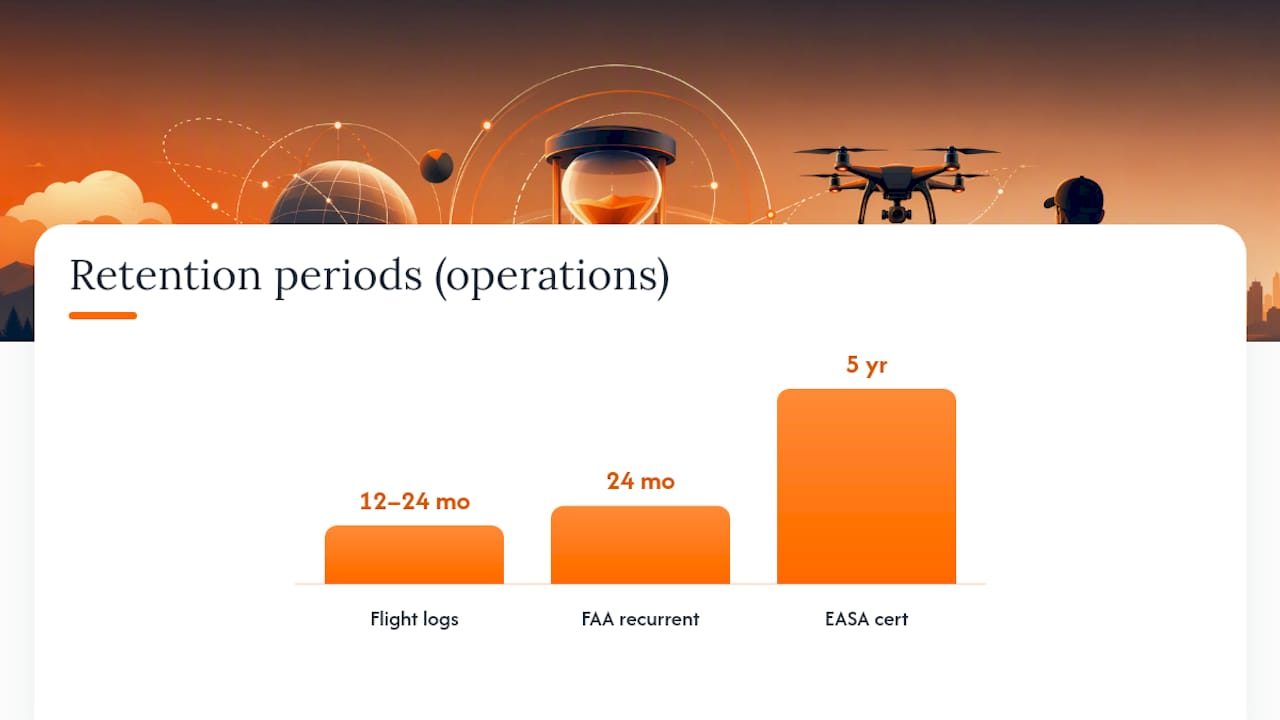
The FAA requires recurrent online training every 24 calendar months to keep aeronautical knowledge current, and your AKTR is valid for that same 24 month window before a new exam is needed. EASA takes a different approach: remote pilot certificates carry a five year validity period, with revalidation available before expiry through a seminar or lighter exam. Miss that window, and renewal after expiry requires full re-examination, a meaningfully harder process.
Industry practice, drawn from enforcement history and inspection norms, points to these retention windows:
- Flight logs: 12 to 24 months minimum
- Maintenance records: for the duration of the aircraft’s operational life
- Training and certificate records: retained for as long as the pilot is commercially active
Archive rather than delete once a record ages past its active window. Regulators and clients alike may ask about a flight from two years ago, and “we deleted that” is never an acceptable answer.
Workflows and Automation That Reduce Risk
Manual tracking fails the same way every time: someone forgets a 24 month deadline, and the certificate lapses mid contract. Automation closes that gap by turning compliance dates into alerts instead of memory tests.
The workflows that matter most:
- Automated recurrent training reminders that fire well before the 24 month FAA deadline, not the week of.
- Certificate expiry dashboards showing every pilot’s status at a glance, which matters the moment you’re managing more than one crew member.
- Automatic flight log capture, linked to pilot credentials and aircraft metadata the moment a flight ends, not entered manually days later.
- Exportable audit packages in PDF or CSV format, carrying timestamps, exam IDs, and a visible change history.
These workflows can be built directly into a platform rather than left to spreadsheets. Drone Passport stores digital credentials and flags approaching expirations automatically. SkyScore™ adds airspace safety context to each logged flight, so the record shows not just where you flew but how that airspace was assessed. Deal Studio pulls from the same credential and flight history to assemble client-facing proposals without re-entering data. The Academy ties directly to recurrent training, so completion records feed straight back into the certificate dashboard instead of living in a separate PDF.
Pro Tip: If your certificate tracking and your flight logging live in two different tools, you have two places for a compliance gap to hide. Consolidating them removes that failure point entirely.
Presenting Records to Inspectors and Clients
The test of any record system isn’t storage. It’s retrieval speed under pressure, whether that’s an FAA ramp check or a client asking for proof before signing a contract.
- Run a pre-flight quick audit: confirm the pilot certificate is current, recurrent training is logged, photo ID matches, and the flight log entry is linked correctly before wheels up.
- Know the common client requests in advance: certification proof, a sample flight history, and incident logs are the three most frequent asks, and each should be a one-click export, not a scramble.
- Build your export checklist around a human-readable PDF or CSV, original exam IDs, aircraft serials, and a visible edit history so nothing looks altered after the fact.
A record system that takes ten minutes to produce a client-ready packet has already failed the audit-ready standard, regardless of how complete the underlying data is.
Why Audit-Ready Record Workflows Actually Matter
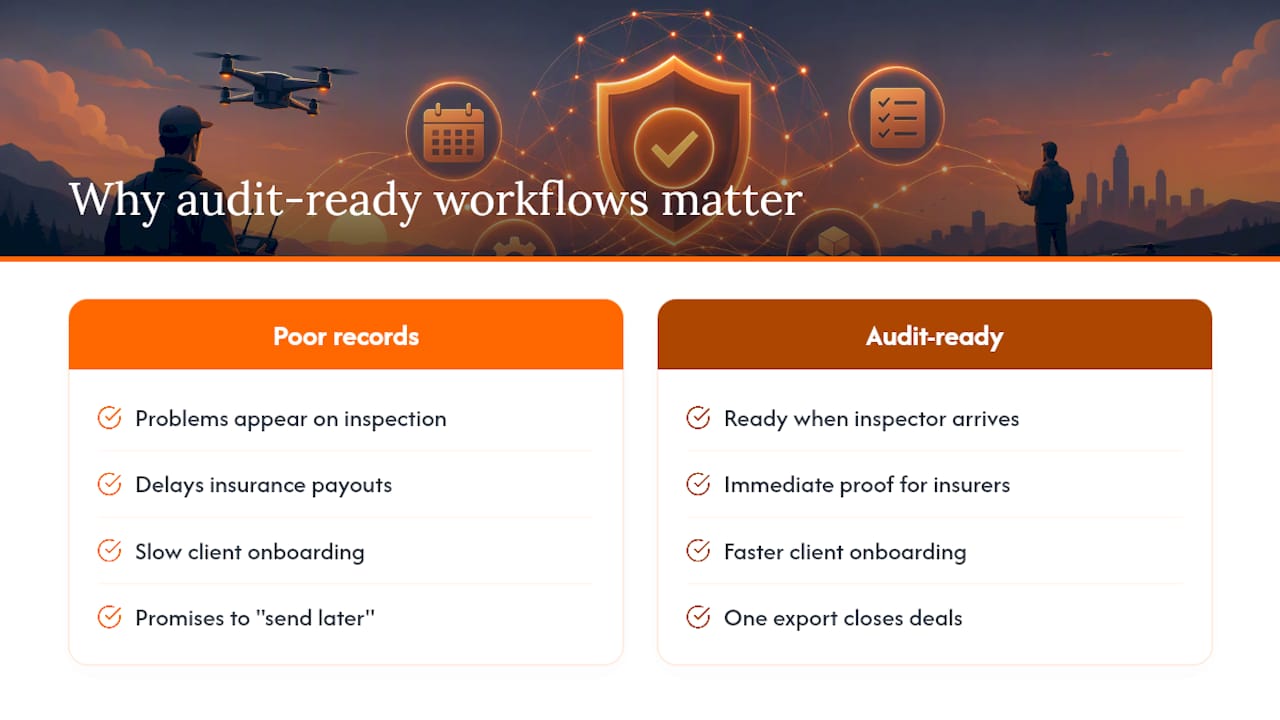
Poor recordkeeping rarely causes problems on a good day. It causes problems on the one day an inspector shows up unannounced, or a client’s insurance carrier asks for proof before a payout. That’s the failure mode worth designing against, not the everyday convenience of skipping a log entry.
Centralized records also change how fast you can onboard a new client. A pilot who can produce certification, flight history, and safety context in one export closes deals faster than one who promises to “send that over later.” Later rarely comes fast enough for a client on a deadline. The gap between operators who treat records as a compliance chore and those who treat them as a business asset shows up directly in how quickly contracts get signed.
How Dronable Supports Training Record Management
Dronable is built around the exact workflow this article describes: certificates, recurrent training, and flight logs living in one linked system instead of three disconnected tools. Drone Passport holds digital credentials and tracks expirations automatically, so you’re never guessing when a certificate needs renewal.

Automated flight logging attaches pilot and aircraft metadata to every mission the moment it’s logged, which means the cross-referencing work described earlier happens without manual entry. SkyScore™ adds airspace safety context to that same flight record, and Deal Studio turns the combined history into client-ready proposals without rebuilding the file from scratch. The result is fewer compliance gaps, faster audits, and proposals that go out the same day a client asks, not the week after.
If you’re setting up your record system from scratch, start with the Operations Manual for workflow guidance, or check the Academy if recurrent training is your next deadline. Either way, Dronable gives you one place to keep it all current.
Sources
- Drone Operator Registration, Authorisations and Pilot Competency | EASA
- UAS Airman Certification Standards (ACS) | FAA
- Drone Recordkeeping & FAA Requirements Checklist (2026 Guide)
Recommended
Explore Dronable Tools
Deepen Your Knowledge
Get step-by-step video courses in the Dronable Academy — FAA Part 107, EASA, real estate drone photography, and more.
Browse CoursesFree: How to Start a Drone Business
The complete step-by-step guide to turning your passion for flying into a profitable drone business — completely free.
- 10 steps to launching your drone business
- 51 proven drone business ideas
- How to get FAA certified (Part 107)
- Pricing, clients & recurring income
Join the Dronable Newsletter
Get drone tips, new articles, and exclusive deals straight to your inbox. No spam, unsubscribe anytime.


